Friday, August 9, 2013

XAML as a mystical experience, Pain Level transcendent

As I’ve blundered through learning XAML in Silverlight 3, 4, 5, WPF, WP7, and now WP8 and Win8, it has always been a painful experience.  I recall the very first time I saw XAML and thought “Oh, no – I’m going to be staring at the ugliness of XML angle brackets for the rest of my life”.  But the promise of portable UI components and a nice designer in Blend made me persevere.  Until now.

Sure, one can eventually achieve guru status and understand all the various binding quirks of XAML and be wonderfully productive.  But for average programmers like me, the pain has always been excessive.  Keeping track of which XAML features are available on each platform is a headache.  Writing pages of XAML to do something simple like changing the background color of a control is a test of one’s faith.  From:  http://www.zagstudio.com/blog/1314#

    If we attempt to use the styles and templates from our earlier WPF example, we quickly discover that WPF XAML is incompatible with Win8 XAML in a few places (mostly the same places as Silverlight):

    • DataTemplate doesn’t have a DataType property. Instead, we have to refer to DataTemplates explicitly by x:Key.
    • ControlTemplate doesn’t have a Triggers collection. Instead, we have to use VisualStateManager to control the appearance of selected and unselected items through visual states.
    • Canvas doesn’t support the Canvas.Bottom or Canvas.Right attached properties. Instead, we must use Canvas.Left and Canvas.Top to position child elements.
    • Various other properties have been moved, simplified, or eliminated.

So, my new resolve is to do as much as possible in code.  Fill up my code behind files.  Write more foreach loops.  At least I can see what’s going on instead of relying on XAML magic to do the right thing.  Hopefully multiple platform support will actually be simpler.

Monday, May 13, 2013

Surface and GPS, Pain level 5

Incredibly, neither the Surface Pro nor Surface RT include a GPS.   Somehow almost every $300 7” and 10” Android tablets can include this feature, but it wasn’t deemed critical to include in a Surface.  DOH!

Saturday, May 11, 2013

Monthly Developer Registration, Pain level 7

I recently took the Victoria Clipper from Seattle to Victoria, planning to use my laptop en-route to do some work during the 3 hour crossing.  A few minutes into the trip, I’m confronted with the monthly dialog to “renew” my development license.

This monthly annoyance suddenly became a major pain since I can’t do any more development until I get an internet connection.   Why exactly?  At the very least, why not a few days grace period.  Good job annoying your developers!

Tuesday, April 23, 2013

Windows 8 Sample Code, Pain level 6

The Windows 8 sample code is designed in a modular fashion which makes it easy for Microsoft to add new pages or “Scenarios” to demonstrate various features of the new Win8 APIs.  While there is a bunch of nice demonstration code, it’s really not written in a fashion which encourages easy borrowing.   The user interface of the “scenario” is all jumbled up with the APIs being demonstrated, so now each developer gets to go through the pain of rewriting the code into a useful format.

Instead of a nice “SampleBackgroundDownloader.cs” class that has 95% of the features each developer would need which is called from the UI code, everybody gets to tear apart “Scenario1.cs” toss out the UI and logging code and rewrite it mostly from scratch.  More pain!

Wednesday, February 27, 2013

No ZipArchive in WP8, Pain level 4

Every 6 hours or so there’s a wonderful new compatibility puzzle to solve.  Win8 has ZipArchive.  WP8 has none! 

What should I choose as a substitute? ZipCompress (solo developer, recent updates, but not spending much time on the project), DotNetZip (no updates for over a year), SharpZipLib-WP7 (no updates for 2 years), or something completely different?

The GetResourceStream() method shown here doesn’t seem to work for large .zip files, presumably because it’s using a MemoryStream internally leading to OutOfMemoryExceptions.

Tuesday, February 26, 2013

GeoPosition and GeoLocator, Pain level 5

Of course you needed to rework the WP7 GeoPosition and GeoCoordinate structures for Win8 and WP8, breaking all of our existing code!  

Fortunately Adam Denning wrote a nice blog post explaining the differences but why-oh-why did you need to make all the replacement classes sealed with no setters?  Now it’s impossible to serialize and deserialize these objects, forcing everyone to invent a duplicate replacement class for persisting routes and courses.

DOH!

Portable Class Libraries, Pain level 5

While Portable Class Libraries are great in theory for sharing code across Win8 and WP8, in practice they’re severely limited by the classes which can be referenced.   The BCL should be segmented at a lower level to make simple non UI classes like Point and Rect available.

IValueConverter incompatible, Pain level 3

Win8 seems to randomly break IValueConverter by making the last parameter a string instead of CultureInfo!  I haven’t found the correct way to fix this, but at least this compiles Win8 and WP8:

public class BooleanConverter<T> : IValueConverter
{
    public BooleanConverter(T trueValue, T falseValue)
    {
        True = trueValue;
        False = falseValue;
    }
 
    public T True { get; set; }
    public T False { get; set; }
 
    public virtual object Convert(object value, Type targetType, object parameter, string language)
    {
        return value is bool && ((bool)value) ? True : False;
    }
 
    public virtual object ConvertBack(object value, Type targetType, object parameter, string language)
    {
        return value is T && EqualityComparer<T>.Default.Equals((T)value, True);
    }
 
#if !WINFX_CORE
    public object Convert(object value, Type targetType, object parameter, CultureInfo culture)
    {
        return Convert(value, targetType, parameter, "");
    }
 
    public object ConvertBack(object value, Type targetType, object parameter, CultureInfo culture)
    {
        return ConvertBack(value, targetType, parameter, "");
    }
#endif
}

Platform fragmentation, Pain level 7

Sure, any platform over time will begin to fragment, but Microsoft seems hell bent on ensuring minimal portability of source code across their recent platforms. Whereas 1992 source code written for Win32 can be recompiled and run without modification throughout the intervening years, the same cannot be said of code written for Silverlight, WPF, WP7 and now Win8 and WP8.  

The half life of supported development platforms has fallen precipitously.  Silverlight, dead.  WPF ailing, WP7 obsolete, and the newcomers Win8 and WP8 proclaiming themselves the new shining path going forward. 

But developers are now gunshy and looking elsewhere, having learned through painful experience that Microsoft seems unable to commit to a coherent, long term development strategy.  Presumably this is an outcome of the org chart from the last decade:

One would have hoped that C# and the painfully verbose XAML would form the foundation of the future, but then COM and  C++ were confusingly resurrected, and we’re all invited to enjoy sprinkle our code with pointy hats:

 task<IVectorView<StorageFile^>^>(picker->PickMultipleFilesAsync())
.then([this, uri] (IVectorView<StorageFile^>^ files)
 

Or we can learn the joys of non-typesafe code by switching to javascript and CSS for coding our Win8 UI (but not WP8!).

Since C#, javascript, and C++ and associated controls and libraries aren’t compatible for developing applications across Win8 and WP8, the future for Windows developers will be one of continued pain. 

…none of the crazy you get from too much choice.

Windows 8 and Windows Phone 8 Pain Log

I’ve been a Windows developer for just about forever, and since my pain threshold has just been exceeded attempting to port existing code to these new platforms, I’ve decided to share my agonies as a form of therapy.

Each item will have an associated numeric Pain value of  1 to 10, with 10 being extreme, out of one’s mind pain.

This should be fun!

Friday, February 10, 2012

Google Video Chat disables other capture applications

Since I recently stumbled back into video capture work for a client, I thought I should bring to light an annoyance with Google Video Chat that caused several moments of consternation.

Google Video Chat installs fake Direct Show video capture drivers (Google Camera Adapter 0 and Google Camera Adapter 1). Although these drivers are registered with DirectShow as functioning capture devices in the category CLSID_VideoInputDeviceCategory they are in fact not available to applications other than Google Video Chat and return errors when they are instantiated using normal DirectShow conventions. Since many programs (including the one I’m in the process of writing!) weren't written to handle the case of a registered , but non-functioning capture device, they fail in various ways, not to mention the general confusion of having a bunch of non-functioning entries in device selection lists within the program.

Since this problem has been known for over a year now but has not been corrected, should one assume that we are witnessing an attempt by Google to undermine the functionality of alternative video capture applications for their own benefit? Evil or not evil, you decide!

The simple fix which would be trivial for Google to implement is to not register the Google Camera Adapter in the CLSID_VideoInputDeviceCategory category.

References:

DirectShow App Mess: Google Video Chat vs. Skype
http://alax.info/blog/1233#more-1233

Hardware/Software issues
http://luizgustavo.wordpress.com/2011/07/30/hardware-and-software-issues/

Google camera adapter causing problems with other programs
https://groups.google.com/a/googleproductforums.com/forum/#!searchin/chat/%22google$20camera$20adapter%22/chat/MygYu9bo_hw/xfCcgy1p2zMJ

GOOGLE CHAT CAMERA BLOCKS MY REGULAR CAMERA
https://groups.google.com/a/googleproductforums.com/forum/#!searchin/chat/"google$20camera$20adapter"/chat/mIXdZWBGOKw/oewf2rIZ1TQJ

Google Camera Adapter shows up as a source when it is not
http://www.tech-archive.net/Archive/Development/microsoft.public.win32.programmer.directx.video/2009-10/msg00026.html

How to uninstall "Google Camera Adapter 0" and "Google Camera Adapter 1"?
https://groups.google.com/a/googleproductforums.com/forum/#!searchin/chat/"google$20camera$20adapter"/chat/5C-JcQjQA7Y/TcHusD0iX3sJ

Tuesday, November 25, 2008

Silverlight 2.0 and facebook

I decided to figure out how easy it would be to embed DeepZoom within facebook as an application.  After wasting most of the day learning to configure IIS7 applications for debugging and downloading and installing toolkits and starter kits, I finally figured out that all this rigmarole is unnecessary if you don’t need to access the facebook API and just want to embed your Silverlight app.

If you have a working Silverlight 2.0 application working within an .aspx page and you want to embed it into facebook, all you really need to do is add a few lines to your web.config file and then set up the facebook application to reference your existing web site.

The lines to be added to web.config are:

<appSettings>
      <add key="APIKey" value="GetThisFromTheFacebookAppConfigPage"/>
      <add key="Secret" value="GetThisFromTheFacebookAppConfigPage"/>
      <add key="Callback" value=”http://www.deepzoom.com/default.aspx”/>
      <add key="Suffix" value="MyIFrameApp"/>
      <add key="TemplateID1" value="20889707566"/>
      <add key="TemplateID2" value="20889902566"/>
</appSettings>

(I have no idea what the last 3 lines do either.)

The facebook app needs to be setup with using an IFrame and needs to have the Callback URL and Canvas URL set according to the instructions here.

If you want to go to the next step and actually access the facebook API, then you’ll need to follow the lengthy instructions at:

Facebook application development in ASP.NET

How to Build Facebook Applications with Silverlight 2 RTW – Part 1 of 2

How to Build Facebook Applications with Silverlight 2 RTW – Part 2 of 2

Tuesday, November 18, 2008

Embedding DeepZoom in FaceBook

It turns out it’s pretty simple to embed a Silverlight control in a FaceBook page.  Here’s the result.  Visit http://apps.facebook.com/nauticalcharts/ to see DeepZoom live.

image

Saturday, June 7, 2008

Moving to Silverlight 2.0 Beta 2 from Silverlight 2.0 Beta 1

Always a willing masochist guinea pig to help uncover the latest round of Microsoft bugs and features, I upgraded to Silverlight Beta 2 the day it became available.  Here is a link to the files you need to install.  I uninstalled Beta 1 components first but others reported no problems upgrading over the Beta 1 bits.

Below is a running list of what needed to be updated on www.deepzoom.com, and here's the official change list.

Updating www.deepzoom.com to B2

  1. Switch to the B2 mime type in your .aspx or .htm file.  Below, the "silverlight-2-b1" has changed to "silverlight-2-b2", and don't forget to change the Installer URL to "LinkID=115261" so your clients will download B2 instead of B1.
       1: <div style="height: 100%; width: 100%;">
       2:     <object type="application/x-silverlight-2-b2" width="100%" height="100%">
       3:         <param name="source" value="ClientBin/DeepZoom.FullScreen.xap" />
       4:         <param name="onerror" value="onSilverlightError" />
       5:         <param name="background" value="white" />
       6:         <div id="no-sl" class="install-badge">
       7:             <img alt="Puget Sound" src="images/SeattleArea.gif" />
       8:             <a href="http://go.microsoft.com/fwlink/?LinkID=115261" 
       9:                 style="position: absolute;
      10:                 text-decoration: none; left: 260px; top: 150px;">
      11:                 <img alt="Get Microsoft Silverlight" 
      12:                     src="http://go.microsoft.com/fwlink/?LinkId=108181"
      13:                     style="border-style: solid; padding: 10px; 
      14:                     background: white;" /></a>
      15:         </div>
      16:     </object>
      17: </div>
  2. Toss out all your B1 Deep Zoom content and create it anew in Deep Zoom Composer B2.  I had problems opening old Composer projects, so I don't know if upgrades are supposed to be supported.  The image metadata is now stored as XML file instead of binary, and the per layer detail from the old format seems to be gone completely.  Here's a sample of the new format:
       1: <?xml version="1.0" encoding="UTF-8" ?> 
       2: <Image TileSize="256" Overlap="1" Format="png" 
       3:     xmlns="http://schemas.microsoft.com/deepzoom/2008">
       4:     <Size Width="14718" Height="14334" /> 
       5:     <DisplayRects>
       6:         <DisplayRect MinLevel="0" MaxLevel="14">
       7:             <Rect X="0" Y="0" Width="14718" Height="14334" /> 
       8:         </DisplayRect>
       9:     </DisplayRects>
      10: </Image>
    This also breaks my Deep Zoom analyzer program, DeepZoomAnalyze.exe, and I'll be working on an update for this problem.
  3. Setting the source for a MultiZoomImage has changed.  Note that DeepZoomImageTileSource is in System.Windows.Media.dll, so add a reference to it:
    using System.Windows.Media;
       1: msi.Source = new DeepZoomImageTileSource(new System.Uri("images/info.dzi"));
       2: // Or
       3: msi.Source = new YourMultiScaleTileSourceOverride();
    Notice that you can now provide your own Tile source provider, which opens up a slew of new possibilities for the use of MultiScaleImage.
  4. Tooltips have changed completely.  Throw away your code and start over.
  5. Update silverlight.js.

And that's about it.  Except for regenerating all of the content, it took about two hours to figure out the changes.  None of the mouse or scroll or zoom logic needed to change which was a great relief.

Deep Zoom Composer Problems and Feature Requests

  1. Uploading a 78MB Tiff file which worked fine in Beta 1 fails to load in Beta 2.  The file opens fine in Photoshop and Paint so I don't think it's a corruption issue.  No error is given at the completion of a long import, but the resulting image is 1x1 pixels.
  2. Importing to Deep Zoom Composer has become painfully slow.
  3. Feature request:  Provide an option when bringing images onto the composer canvas to not scale the images to some random default value.  I need to have the relative scale of multiple images preserved, but it looks like Composer finds the largest image dimension for all images, and then scales all subsequent images to this value.  While this might be the generally desired behavior, there's another large class of applications in which autoscaling is the wrong choice.
  4. Feature request:  Let me assign a transparency value to an image so I can align images which overlap others.

VS2008 problems

  1. For a while, every time I touched a XAML page in VS2008, it reported an exception but then completed my request anyway.  But this problem seems to have disappeared after a restart or two, this seems to have gone away.

Wednesday, June 4, 2008

DG.TV Jose Fajardo on DeepZoom Awesomeness

Jose Fajardo has a DeepZoom demonstration posted by Delicate Genius which ponders the question, “What if every web image is DeepZoomable?” 

Dive on into “DeepZoom Awesomeness”:

Thursday, April 10, 2008

DeepZoom.Analyze

To help unravel the mysteries of how the Silverlight MultiScaleImage control works, I've created an analysis tool which displays each layer of the composite image individually.

Each level of a DeepZoom image consists of a sparse 2D array of separate JPEG images which are tiled together to create the composite image. Zooming in moves through the layers smoothly. Tiles are progressively downloaded as needed for display, and layers are blended using animation.

The lowest level is numbered zero. The highest level is equal to 1 + log2 of the largest image dimension. As you move from the highest level backwards, each level is 1/2 the width and 1/2 the height of the next level up the tree. This progression continues to layer zero which is a 1 x1 pixel image.

You can see the sparse nature of the array at level 12 of the image below. The tiles in the lower left corner are absent since they can be adequately represented by tiles at lower levels (lower zoom values).

image

Below is level 14 of the same image. Note the dimensions of 14,718 x 14,334 pixels, and that the level consumes 43MB. You can see this image in action at http://www.deepzoom.com/.

image

Usage: Open the info.xml file associated with the Deep Zoom image tree, and then use the scroll bar to select which level to view. Note that the file open operation runs on the UI thread, so there will be a short delay when opening huge image trees. The info box in the bottom right shows details such as dimensions and total kilobytes used at the selected level.

Clicking "Tile Presence" shows the whether the tile is used in the current level. In Silverlight 2.0 B1, the tile presence elements don't seem to be used consistently, and are missing entirely from some layers which do have image tile data. And the MeanSquareError and BitsPerPixel fields also seem to be currently unused.

image

Here's the download, an 10KB .zip file (I didn't realize WPF applications would be so tiny!)

  • Requirements: DotNet 3.5.
  • Download: DeepZoomAnalyze.zip (Last updated 2008.06.29 for Silverlight Beta 2 -
    Note: only compositions are presently working, collections fail silently.)

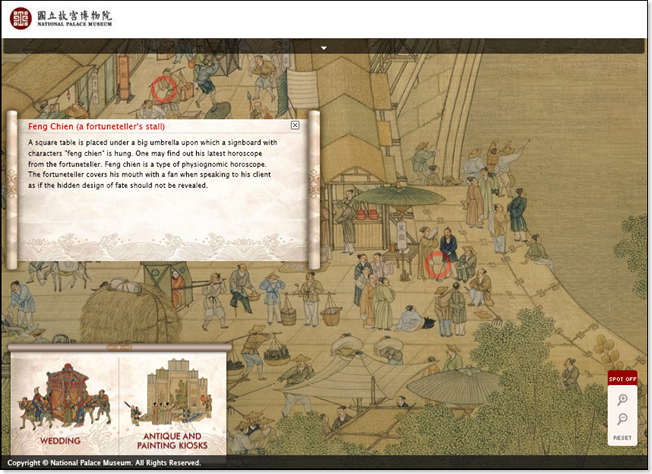
Deep Zoom: National Palace Museum -- Along the River During the Ch'ing-ming Festival

The National Palace Museum in Taiwan has a lovely Deep Zoom demonstration which uses animation, transparent overlays, and an image navigation bar.  The source image appears to be on the order of 16K pixels wide, but that's just a rough guess.

image

See it at http://learnet.npm.gov.tw/silverlight/

Wednesday, April 2, 2008

Deep Zoom: How Deep can we go?

To date, it looks like Randy George has done the most work to push the size limits of Deep Zoom images.  From his blog post:

After a few minutes the result is a tiff image of 86400×43200 of about 11Gb. Now it is time to use the Deep Zoom Composer (actually a decomposer) to process this into a MultiScaleImage info.bin
When I attempted an import of this 11Gb tiff into Deep Zoom Composer, the Mermaid.exe choked after a few minutes. I guess we aren’t ready for geospatial scale exactly yet. Note to self: do this with -o Tiff, since mermaids may not like GTiff.

He then successfully creates a 16Kx16K image:

The largest mosaic I was able to get Deep Zoom Composer to accept was 8×8 or 16000px x 16000px which is just 4000m x 4000m on the ground. Feeding this 143Mb mosaic through Composer resulted in a pyramid consists of 5344 jpg files at 82.3Mb. However, scaling to a 5000m x 5000m set of 100 tif, the 221Mb mosaic, failed on import to Deep Zoom Composer.

It's unclear whether the dimensional limits are related to 32-bit Vista's 3GB memory or some maximum pixel dimensions.  Does anybody know which?

Above is the actual DeepZoom result.

Project Silverlight - Deep Zoom Internals

Wilfred Pinto has a great blog on Silverlight and Deep Zoom including internal file formats for items.bin and layout.bin, and how to select subImages using Linq. Check it out at http://projectsilverlight.blogspot.com/.

image

Monday, March 31, 2008

Vertigo BigPicture sample code published

Vertigo's BigPicture sample code which was presumably used for the HardRock Memorabilia Site has just been published on CodePlex. 

We finally have a gold standard for mouse wheel control.